
Updated November 3, 2026
Greenhouse Guide: Seeds, Fruit and Haki Armor
Use the seed preview, understand the four seed slots and compare Fruit with Haki Armor before growing.
§Build a seed batch#
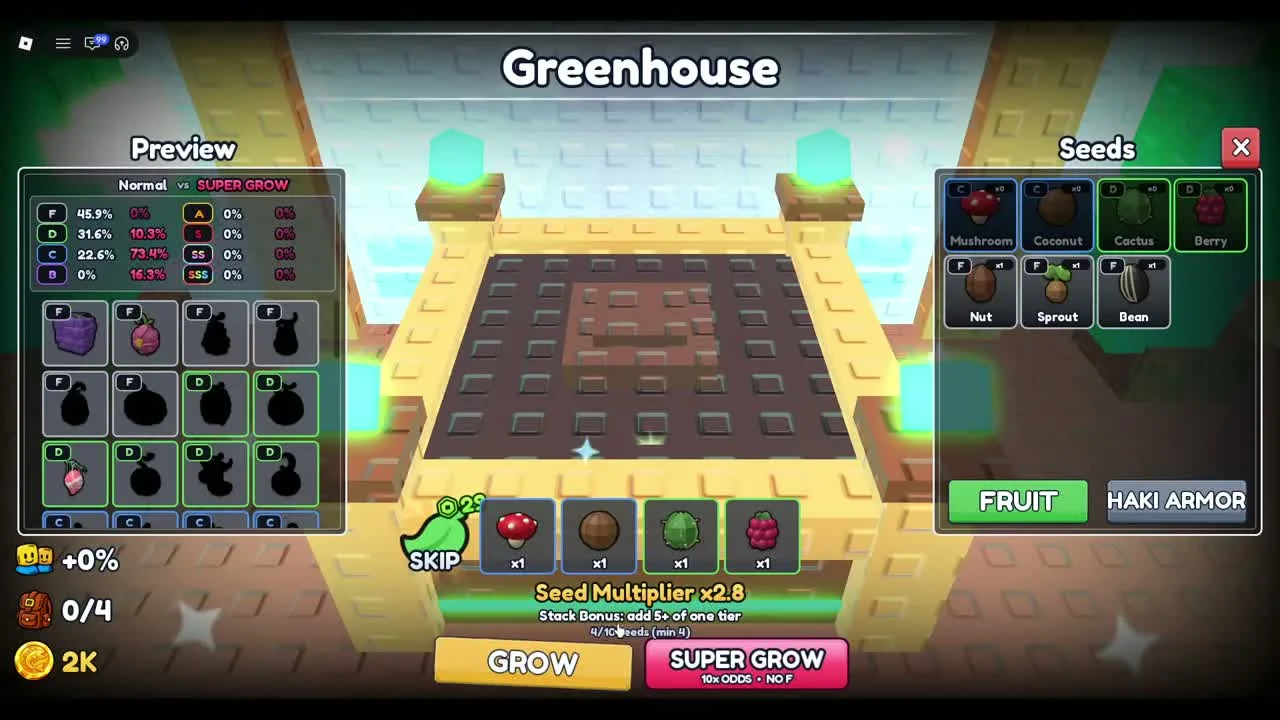
The Greenhouse screen shows four seed selection boxes beneath the central plot. A filled example uses Mushroom, Coconut, Cactus and Berry, one of each. The text below reads 4/10 seeds (min 4). The minimum and batch limit here are observations from this recording.
The same screen displays Seed Multiplier x2.8 for that exact selection. This value belongs to the shown batch. It is not a universal multiplier for every combination. Change one selection at a time and compare the preview so you can see what that seed contributes.
§Read Normal and Super Grow separately#
The left panel lists tiers from F through SSS with separate Normal and Super Grow columns. In the observed fruit batch, Normal includes F, D and C chances while Super Grow has a different distribution. Use the column that matches the button you intend to press.
The interface also advertises a stack bonus for adding five or more of one tier. The selected example has four different seeds and does not demonstrate that bonus. Do not treat a large multiplier as a guarantee of a specific fruit or tier.
Super Grow is a separate action and advertises improved odds on the button. Check its current cost and confirmation before using it. The normal Grow path is sufficient to understand the batching workflow.
§Switch to Haki Armor for defensive equipment#
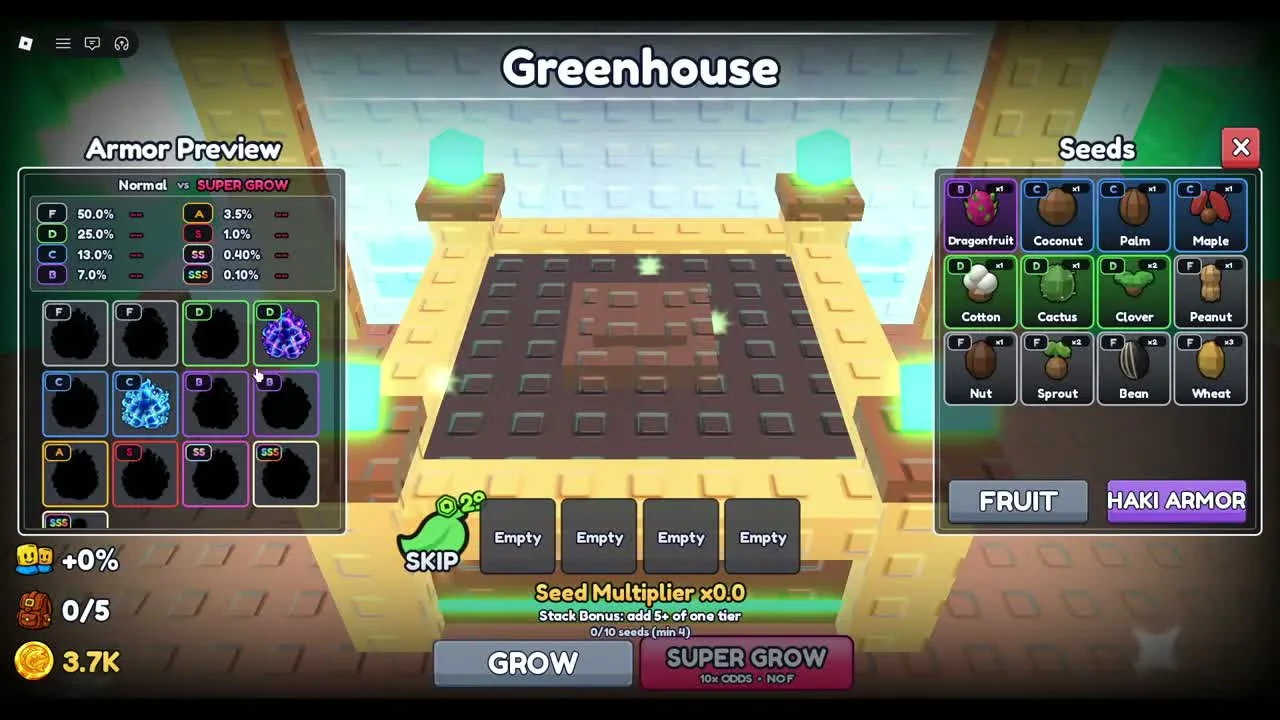
Use the Haki Armor button on the right to change the output mode. The heading becomes Armor Preview, the catalog changes to armor silhouettes and the active button is highlighted. The seed inventory stays visible beside it.
An empty armor selection shows four Empty boxes, Seed Multiplier x0.0 and 0/10 seeds (min 4). If Grow is inactive, fill the batch and confirm the mode first. A fruit batch and an armor batch serve different equipment needs.
§Recognize the drops you are collecting#
The early battle footage shows Maple Seed, Palm Seed and Coconut Seed on the ground. The Greenhouse inventory additionally shows Dragonfruit, Cotton, Cactus, Clover, Peanut, Nut, Sprout, Bean and Wheat in the armor example. This is an observed subset, not a complete seed index.
Collect a useful batch before leaving the run. If your bag is full, review its contents and the Sell stand at the hub. Keep the seeds you intend to combine; do not sell everything solely to clear a counter.
§FAQ#
How many seeds do I need?
The reviewed Greenhouse screen shows a minimum of four and a maximum of ten per batch. Confirm the current label in your game.
Why am I seeing armor instead of fruit?
Check the mode buttons on the right. Haki Armor switches the output list to armor; choose Fruit for fruit growth.
§Continue in this section#
Hub
All +1 Power Fruit Evolution Guides
Pick a task: start a run, grow a fruit, survive a stage, prepare a rebirth, or check the current codes evidence.
GuideArticle
Beginner Guide: Training, Seeds and Your First Fruit
Follow the visible hub route from Power training to stage battles, seed collection and the Greenhouse.
GuideArticle
Combat Guide: Stages, Special Attacks and Seed Drops
Read the fight interface, collect seed drops and prepare for tougher stages without relying on invented damage thresholds.